
To save YouTube, X, and LinkedIn research in one place, organize by project rather than platform. Capture the useful content or passage together with its URL, author, and your note about why it matters. This creates one source set that can be searched and compared later.
Platform-based folders look tidy but fragment the question you are researching. A customer insight does not become less relevant because one version appeared in a video and another in a post.
Create a project before you collect
Name the project after an outcome, such as “launch positioning,” “creator research,” or “onboarding objections.” Write one sentence describing what belongs.
For example:
Save sources that explain why solo operators struggle to reuse research across their AI tools.
This boundary helps you ignore entertaining material that does not affect the work. It also gives later search and synthesis a narrower collection.
Avoid creating separate projects for YouTube, X, LinkedIn, and articles. The platform is useful metadata, not the purpose of the research.
Save the content, not only the link
Social and video sources can change, disappear, or become difficult to search. Preserve enough content to understand what made the source useful.
For a YouTube video, keep the title, URL, transcript or relevant passage, creator, and timestamp when available. For an X or LinkedIn post, keep the author, post text, URL, and surrounding context needed to interpret it. For an article, keep the article body or selected passages.
Add a short note when the relevance is not obvious:
- “Customer language for the opening hook.”
- “Contradicts the common retention advice.”
- “Potential example for the onboarding section.”
A note should make retrieval easier, not summarize everything.
Capture while the source is open
A browser extension reduces the handoff between discovery and organization. SauceTab lets you choose a project and save an article, full page, selection, or highlight without leaving the source.
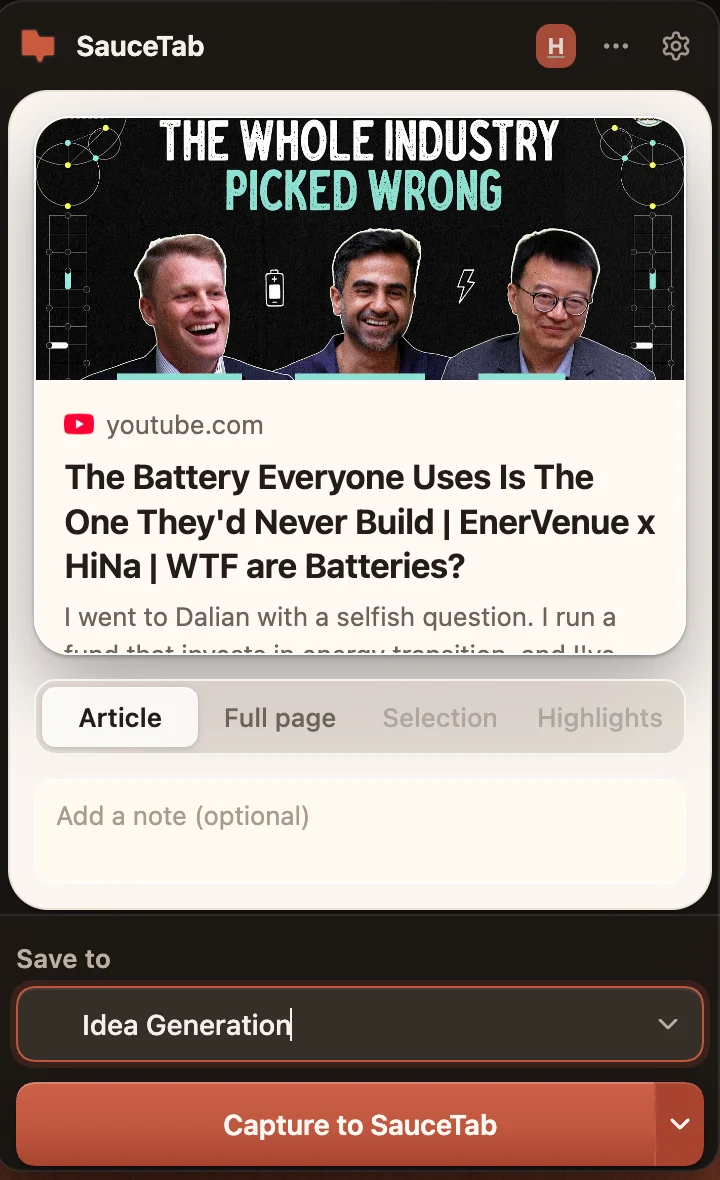
The extension should only capture when you trigger it. Review the preview, confirm the destination, and avoid saving private material to a shared workspace unless you have permission.
When a platform page cannot be captured reliably, save a selected passage and note rather than relying on a broken full-page extraction.
Ask cross-platform questions
Once sources share a project, ask questions that the original platforms cannot answer:
- Which customer problem appears in both posts and long-form videos?
- Where do creators disagree about the workflow?
- Which phrases recur across independent sources?
- What examples support the same claim?
- Which conclusions rely on only one source?
The answer should name the sources and allow you to open the supporting passages. Cross-platform synthesis is valuable because each format contributes different evidence. A short post may reveal language, while a long video explains the mechanism behind it.
Keep a source-quality hierarchy
Not every saved post deserves equal weight. Mark firsthand customer statements, official documentation, measured experiments, expert interpretation, and casual opinion differently in your reasoning.
A practical hierarchy is:
- Direct evidence from the project or customer.
- Primary documentation and original data.
- Detailed firsthand experience.
- Expert analysis that cites its sources.
- Unsourced opinion or repeated claims.
The system can store all five, but your output should not treat them as equivalent.
Review the project, not every platform
Run a short weekly review. Remove duplicates, add notes to ambiguous sources, and archive material that no longer affects the question. Then update the current project summary with the strongest finding and the biggest unresolved gap.
The result is not a social-media archive. It is a project memory made from the best evidence you encountered across platforms.