
The best research organizer Chrome extension depends on what should happen after you save a page. SauceTab is best suited to project-based research that needs source-grounded AI retrieval. Glasp emphasizes highlighting across web, PDF, and YouTube material. Readwise Reader combines capture with a reading queue, while general bookmark tools are better when storage and manual organization are enough.
A research extension should do more than create another list of links. It should preserve the useful content, its source, and the project or question that made it worth saving.
What to look for in a research extension
Evaluate the extension with the material you actually research. Product pages, authenticated social posts, long articles, videos, and selected passages create different capture requirements.
Use these criteria:
- Capture modes: Can you save an article, full page, selected text, or highlights?
- Source preservation: Does the saved item retain the URL, title, and enough content to remain useful?
- Project organization: Can you choose the destination while saving?
- Retrieval: Can you search across saved content rather than only titles and tags?
- AI grounding: Do generated answers show which sources or passages were used?
- Portability: Can you export the research or connect it to other tools?
- Privacy: Does the extension capture only when you ask it to?
The fastest capture button is not helpful if the result becomes an unsearchable pile.
Recommended options by use case
| Extension | Best for | Capture model | What happens after capture |
|---|---|---|---|
| SauceTab | Project research for AI-assisted work | Article, page, selection, highlights, and supported rich sources | Project search, synthesis, source-backed answers, and MCP access |
| Glasp | Highlight-centered learning and discovery | Web, PDF, YouTube, and other highlight formats | Highlight library, social discovery, chat, and idea generation |
| Readwise Reader | Read-later and highlighting | Articles, newsletters, documents, and reading material | Reading queue, highlights, resurfacing, and connected workflows |
| Raindrop.io | Visual bookmarking and collections | Links, pages, and media bookmarks | Collection management, tagging, search, and sharing |
| Zotero Connector | Academic and citation-heavy research | Publication metadata, snapshots, PDFs, and references | Citation library and academic reference management |
Check each provider's current documentation before relying on a specific capture format. Browser sites change, and extension support can evolve with them.
SauceTab for project-based research
SauceTab asks you to choose the project when you save. That small decision prevents sources from becoming one global inbox. The extension can preserve the full article, full page, selected passage, or highlights together with the URL and a note.
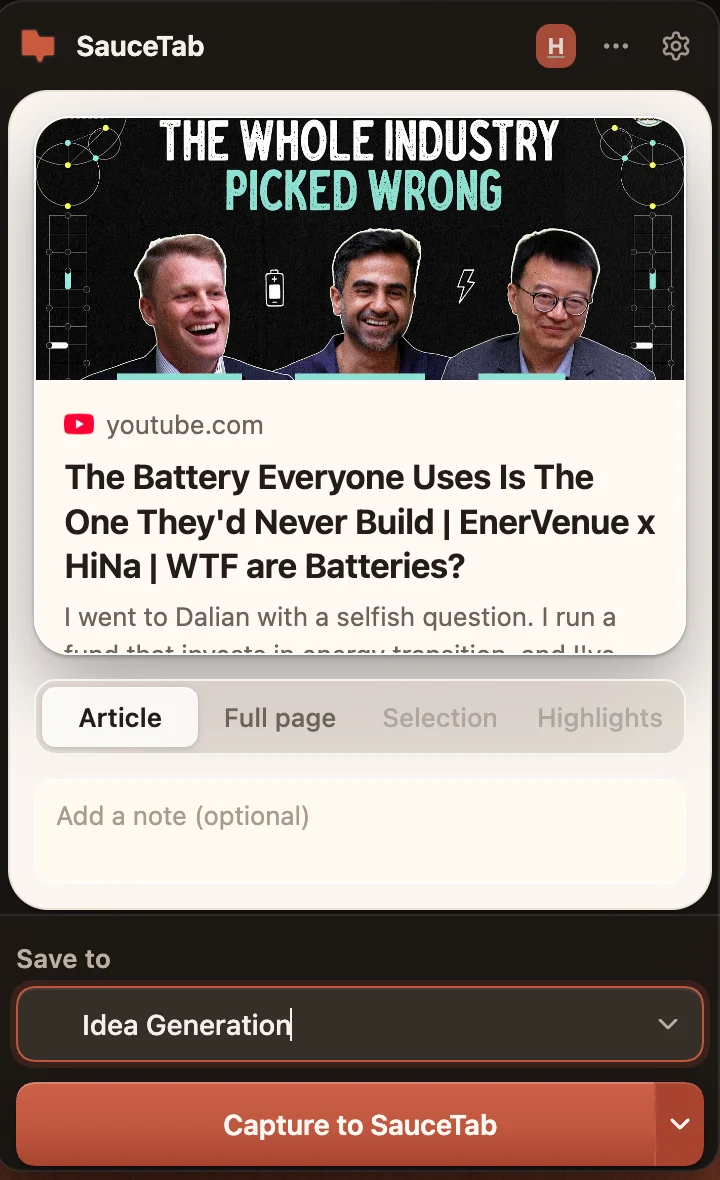
The saved material becomes usable as a set. You can ask questions across the project and inspect the sources behind the answer. The same project can also be exposed to compatible AI clients through SauceTab MCP.
Choose it when research is a reusable input to product work, content, customer discovery, or another ongoing project.
Glasp and Readwise for active reading
Glasp's official feature overview describes highlighting for webpages, PDFs, and YouTube videos, along with chat and idea generation from saved passages. It is a strong choice for people who learn by highlighting and value a social layer around reading.
Readwise Reader is built around capturing material to read, highlighting it, and resurfacing what mattered. Its connected workflows can also make reading history available to compatible AI clients.
Choose these when the reading queue and highlight habit are more important than strict project boundaries.
Raindrop.io and Zotero for specialized organization
Raindrop.io remains useful for people who want collections, tags, visual bookmarks, and sharing without making AI synthesis the center of the system.
Zotero Connector is the stronger fit for academic work where bibliographic metadata, citations, publication records, and PDF management are essential. A general AI capture tool should not replace a citation manager when formal references are part of the output.
Run a ten-source test
Install only one or two candidates. Save ten representative sources and wait a day before trying to retrieve them.
Test whether you can:
- Find a source without remembering its title.
- Open the exact passage that mattered.
- Compare information across three saved items.
- Move or export the collection.
- Use the research in the tool where the final work happens.
The best research organizer is the one that completes the loop from capture to evidence-backed use.